NETSETTER

NETSETTER

ads

Thursday, June 6, 2013

DC-Unlocker - ZTE Qualcomm modems Flasher new version


Download here

Warning!
MF190 has 2 hardware versions
64K and 128K nand firmware are not compatible!!! If not compatible nand firmware updated, modem will be bricked. It will be possible to repair only with JTAG.
MF190 IDEA has 64K nand flash
Mf190 Tata and MF190U Airtel has 128K nand.
Before updating firmware, please ensure that firmware file size is correct for modem.


What is new?

-Unlock customized modems by rewriting firmware (like INDIA Airtel, IDEA, TATA, SMARTBRO, TELMA and etc..) .
-Write firmware and dashboard
-Support area with many fimwares for ZTE Qualcomm modems.
-Auto backup NV Items
-Restore NV Items
-Repair modems (can be repaired if modem is visible by pc, required one port)

Supported models :

ZTE MF180
ZTE MF190
ZTE MF190U

Unlock MF190U Airtel tutorial
Unlock MF190 IDEA tutorial
Unlock MF190 Tata tutorial

Note: to use software, you need to have activated dc-unlocker/rocker/vygis or infinity dongle with credits, or to have Unlimited ZTE Qualcomm modems flasher activation on your dongle. Get it here .
Read more ...

Monday, May 27, 2013

DC UNLOCKER ZTEICERA UNLOCKER CLIENT V1.0025 cracked


 DOWNLOAD NOW = 3.3mb
DON'T FORGET JOIN THIS WEBSITE
Read more ...

d-link DWM-156 3g usb modem problem solved 10000%%%%%%

 hi, after upgrading to windows 8 from windows 7 my d-link dwm-156 usb modem not detected

 here is the solution

first download the latest firmware
and install to dlink dwm 156 model device

other models am provide the download link via comments


a) Right click on the driver setup file and select Properties.
b) Click the compatibility tab, tick the box next to Run this program in compatibility mode for and select Windows 7.
c) In the list-down box; then try installing the device driver via Run as administrator.

Reply with more information to help you better. Keep us posted if you face any issues on windows in future. We will be glad to help you.


DON'T FORGET JOIN THIS WEBSITE
Read more ...

Thursday, May 23, 2013

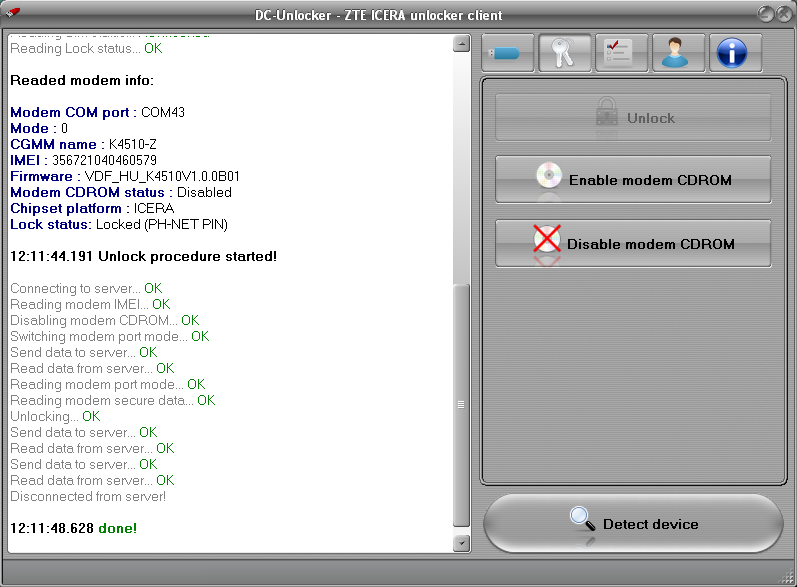
DC-Unlocker ZTE Icera Unlocker client v.1.0025


DC-Unlocker - ZTE Icera Unlocker client v.1.0025


Download here

What is new?

DC-Unlocker - ZTE Icera Unlocker client v.1.0025

-Added automatic wrong code counter reset.
-ZTE MF691 and MF591 unlocking fixed.
-Few other bugs fixed.

DC-Unlocker - ZTE Icera Unlocker client v.1.0020
-Direct Unlock for allmost all ZTE Icera modems in few seconds
-Dissable/Enable CDROM

Supported modems :
ZTE MF186
ZTE MF190B
ZTE MF190J
ZTE MF192
ZTE MF192+
ZTE MF195
ZTE MF195E
ZTE MF591
ZTE MF652
ZTE MF660
ZTE MF660B
ZTE MF665C
ZTE MF665E
ZTE MF665K
ZTE MF691
ZTE Vodafone K3770-Z
ZTE Vodafone K3772-Z
ZTE Vodafone K3805-Z
ZTE Vodafone K3806-Z
ZTE Vodafone K4510-Z


Note: to use software, you need to have username/password for dc-unlocker or activated dc-unlocker/rocker/vygis or infinity dongle with credits.

Prices:
-For customers with user accounts unlock costs 7 credits
-For custumers with activated dc-unlocker/rocker/vygis or infinity dongle unlock costs 2 credits
-For customers with Unlimited ZTE Icera Unlocker activation on dongle unlock costs 0 credits. Get it here

Warning! Indian Vodafone K3770-Z are not locked, they have customized dashboard, you can debrand it here link

Unlock tutorials:
ZTE MF190B text video tutorial
ZTE MF190J text video tutorial
ZTE MF192 text video tutorial
ZTE MF195E text video tutorial
ZTE MF652 text video tutorial
ZTE Vodafone K3772-Z text video tutorial
ZTE Vodafone K3806-Z text video tutorial
ZTE Vodafone K4510-Z text video tutorial
Read more ...

Wednesday, May 15, 2013

DC-Unlocker ZTE Icera Unlocker client v.1.0020

 DC-Unlocker - ZTE Icera Unlocker client v.1.0020

What is new?

DC-Unlocker - ZTE Icera Unlocker client v.1.0020
-Direct Unlock for allmost all ZTE Icera modems in few seconds
-Dissable/Enable CDROM

Supported modems :
ZTE MF186
ZTE MF190B
ZTE MF190J
ZTE MF192
ZTE MF192+
ZTE MF195
ZTE MF195E
ZTE MF591
ZTE MF652
ZTE MF660
ZTE MF660B
ZTE MF665C
ZTE MF665E
ZTE MF665K
ZTE MF691
ZTE Vodafone K3770-Z
ZTE Vodafone K3772-Z
ZTE Vodafone K3805-Z
ZTE Vodafone K3806-Z
ZTE Vodafone K4510-Z


Download and more information here: 

DON'T FORGET JOIN THIS WEBSITE
Read more ...

Thursday, May 9, 2013

DC-unlocker client software V1.00.1024


DC-unlocker client software V1.00.1024
Added:

Modems:
Huawei HiMini E369
ZTE MF200

Embedded modules:
Sierra Wireless MC8705

Phones:
ZTE T96

DOWNLOAD NOW
DON'T FORGET JOIN THIS WEBSITE
Read more ...

Sunday, April 14, 2013

DC-unlocker client software V1.00.1018


DC-unlocker client software V1.00.1018


Added:

Modems:
Huawei E3251 Hilink
Huawei E359
Huawei T353
ZTE MF823
ZTE Vodafone K4505-Z
ZTE Vodafone K5006-Z
Longcheer WM72 (new modification LQA00D8.1.2_MG66)

Routers:
Huawei Vodafone R208
Huawei B200
Huawei B932
Huawei E5756
ZTE Vodafone R203-Z

Embedded modules:
Huawei EM920

Customized modems:
Huawei E1731 11.126.29.01.284 Jan 31 2013 15:02:49 (Airtel India)

Direct access to support.

DOWNLOAD NOW


DON'T FORGET JOIN THIS WEBSITE
Read more ...

Saturday, January 12, 2013

Huawei G6622 Format & Unlock Done

Huawei G6622 After Format Goes To Network Unlock Code If Put Sim Card
First Format, After Format Do Network Unlock,
After Unlock Show
''' Not Exist Or Unsupport '''

Don,t Worry Set Unlock Done And Put Any Sim Card
Enjoy


FORMAT


 UNLOCK


DON'T FORGET JOIN THIS WEBSITE
Read more ...

Thursday, November 8, 2012

Samsung unlocker free

samsung unlocker free for agere&trident...............................


 DON'T FORGET JOIN THIS WEBSITE
Read more ...

Thursday, October 4, 2012

Huawei Calculator v2.1 by RaJeEv.B

Huawei Calculator v2.1 by RaJeEv.B

Huawei Calculator v2.1 by RaJeEv.B

15 Digit IMEI :
Server Status : OK


© RaJeEv.B 2012.

b.rajeev35@gmail.com

Read more ...

Saturday, September 29, 2012

Mobile Partner Indian Version 23.001.07.04.910

Mobile Partner Indian Version Latest : 
UTPS23.001.07.04.910_MAC23.001.07.04.910  is released for Huawei E303C.


This version have too many new functions :

-> Auto APN/Profile Selector based on MCC+MNC
-> Auto APN is only for Indian MCC+MNC.
-> New Widget Style
-> Four new skins
-> Call, SMS , Phonebook, Statistics, Volume Limit, Dynamic SMS Center Number.
-> Facebook and Twitter links ( added mine :) )
-> Online Update
-> Completable with Every Huawei Modem..

Download :-


DON'T FORGET JOIN THIS WEBSITE
Read more ...

Friday, September 21, 2012

Huawei U8815 (Ascend G300) detect and unlock procedure


Huawei U8815 (Ascend G300) detect and unlock procedure

Extract them in your computer and launch “DriverSetup.exe“.
NOTE: Drivers must be downloaded from this procedure only. Installing other drivers might not make phone visible for DC-Unlocker software, so no possibility to unlock.
driverSetup.exe folder view
Wait till drivers fully install and this message disappear. After message disappeared, restart computer(necessary step).
Configuring software
Turn off phone. Press "Volume down", "Volume up" and "Power" buttons. Hold them pressed for 5 seconds. Phone screen should become purple/pink. Connect phone to computer using USB cable.
Huawei U8815 phone unlock. Press and hold Vol-, Vol+, Power buttons

Further actions require internet connection and DC-unlocker software
Launch DC-Unlocker client software.
Launch DC-unlocker

Go to server tab, enter username and password, click "Check login". (If you do not have username for DC-Unlocker software, you can buy credits to receive it: www.dc-unlocker.com/buy)
If DC-Unlocker/Vygis/Rocker/Infinity dongle is connected, do not enter username and password, only click "Check login".
Check login

Select manufacturer: Huawei phones, model leave Auto detect (recommended).
Press detect button (Big magnifying glass).
Select manufacturer and press detect button

Wait till DC-Unlocker fully detects phone.
Phone is fully detected

Open unlock tab and press unlock.
Press unlock in unlocking tab

Wait till you see a message that phone is unlocked.
Huawei u8815 unlocked

After you see that phone is successfully unlocked, remove battery and restart phone.


DON'T FORGET JOIN THIS WEBSITE
Read more ...

DC-Unlocker client software V1.00.0928

DC-Unlocker client software V1.00.0928

Added:

Modems:

Huawei E173Bu-1 (Airtel India) -FREE Unlimited unlock for dongle users
(detected as E1731 11.126.29.00.284 Aug 13 2012 19:28:09)

Phones:

Huawei C8150 -FREE Unlimited unlock for dongle users
Huawei U8815 -FREE Unlimited unlock for dongle users
Huawei Ascend G300 -FREE Unlimited unlock for dongle users

Unlocking manuals :

Huawei E173cs-1:
http://unlockurdevice.blogspot.in/2012/09/huawei-e1731cs-1-airtel-india-detect.html

Huawei U8815,Huawei Ascend G300:
http://unlockurdevice.blogspot.in/2012/09/huawei-u8815-ascend-g300-detect-and.html

Now almost all Huawei phones unlock unlimited with dc unlocker. Changed to Free unlimited for dongle users :

Orange Stockholm
Optimus Stockholm
Huawei Gaga
Huawei Ideos X1
Huawei U8600
Huawei U8652
Huawei U8510
Huawei Ideos X3
Huawei U8180
SFR STARSHINE
Huawei U8650
Huawei U8651

Visit us: http://www.dc-unlocker.com


DON'T FORGET JOIN THIS WEBSITE
Read more ...

Huawei E1731Cs-1 Airtel India detect and unlock procedure


Huawei E1731Cs-1 Airtel India detect and unlock procedure

Unlock procedure will work on E173Cs-1 Airtel India modems with these firmware versions:
21.157.31.00.284 (Build: Mar 17 2012 12:15:53)
21.157.13.00.284 (Build: Feb 16 2012 11:05:38)
Extract archive and launch “DriverSetup.exe“.NOTE: Drivers must be downloaded from this link only. Unlock with other drivers installed will not work.
Click "Start".
Click start in update wizard
Wizard will detect modem and ask for firmware code.
Click start in update wizard
Launch DC-Unlocker client software.
Launch DC-unlocker

Open Server tab, enter your username and password that you received after credits purchase. Click "Check login". (you can buy credits here www.dc-unlocker.com/buy)
If DC-Unlocker/Vygis/Rocker/Infinity dongle is connected, do not enter username and password, only click "Check login".
Check login

Select manufacturer: Huawei modems, model: Huawei E303, proceed to "Unlocking" tab.
Select Huawei modems and model E303

Select "Generate Firmware code by IMEI".
Enter IMEI number.
Select manufacturer and press detect button

Click "Do job" button.
Software will generate firmware code.
Press do job and firmware code will be displayed

Enter generated firmware code to firmware update wizard and click "OK" button.
Copy generated firmware code to update wizard

Wizard will start to update modem firmware. Do not disconnect modem or turn off computer – you can damage modem.
Wait till drivers fully install and this message below (Please wait..configuring software) disappear. After message disappears, restart computer (necessary step).
Click start in update wizard
Remove SIM card from modem.
Wait till you see a message that modem is unlocked.
Modem is fully detected

Open Unlock tab, select “Read unlock code and auto enter to modem”.
Click “Do job”.
Press unlock in unlocking tab

Wait till you see a message that phone is unlocked.
Huawei u8815 unlocked

After you see that unlock is successful, restart modem.


DON'T FORGET JOIN THIS WEBSITE
Read more ...

Friday, September 7, 2012

AIRCEL, IDEA ZTE MF190 UNLOCKING FREE

AIRCEL, IDEA ZTE MF190 UNLOCKING FREE

HERE CRACK DC-UNLOCKER DOWNLOAD LINK-  click here 

AUTO UPDATE DASHBORAD-   click here  

PROCESS....

1- INSERT UR MODEM AND INSTALL UR SETUP
2-OPEN DC-UNLOCKER CRACK SELECT ZTE DATACARDS 
3- SELECT AUTO DETET{RECOMMENDED} PRESS SCAN
4-NOW MODEM IS DECTED...GO TO UNLOCKING AND PRESS UNLOCK

5-Reconnect your modem
6-press scan, then modem is detected,,, go to FLASH and press WRITE DASHBOARD
7-Select ZTE MODEM.ISO
FINISH

NOW UR MODEM IS UNLOCK....

STEP 2......


NOW UR MODEM ID READY TO USE OTHER GSM NETWORK

Thanks to 
BRO...
AMIT SHARMA


source : gsm-forum


DON'T FORGET JOIN THIS WEBSITE - www.unlockurdevice.blgospot.com
Read more ...

Tuesday, September 4, 2012

LG KExxx Unlocker


Supported Modeles:

KE500, KE970, KE850,

Download:
LG_KExxx_unlock


DON'T FORGET JOIN THIS WEBSITE
Read more ...

Monday, September 3, 2012

E369 Mini


HiMini
The world's smallest HSPA+ data card with a dimension of 65*24.5*8mm, HiMini is tailored for slim laptops and acts as
a best partner with Macbook Air.

Read more ...

Huawei Ascend G300- An Entertainment Powerhouse


Fast track your life with the Huawei Ascend G 300 that features a 1GHz Qualcomm processor. Explore your world on a wide touch screen that lets you bring alive your entertainment or work seamlessly.
Stay connected to your world through a plethora of options including WiFi connectivity, Bluetooth, Social Networking and much more!
Get smarter with features built in that help you do more; Proximity sensor for auto on/off to help you save
the battery for when you need it the most, along with ambient light sensors and more!
Read more ...

E303 Cloud+

Key Highlights


introducing Huawei E303 Cloud+ 3G Data Card which can work with any 3G SIMs just choose your operator and start using the internet. E303 Cloud+ comes with 2GB cloud storage and with Message+ feature you can chat, share files, photos with your friends and groups.
DL 7.2Mbps UL 5.76Mbps
HSUPA/HSDPA/EDGE/GPRS/GSM
Micro SD Card Slot
Support Windows, MAC OS, Linux

Read more ...

Monday, August 20, 2012

Mkey Mini Flasher v6.0.8 full crack


Mkey Mini Flasher v6.0.8 full crack (WITH MKEYDONGLE EMULATOR)


DON'T FORGET JOIN THIS WEBSITE
Read more ...